Harshal Dewangan

CEO & Founder at Dewa Direction

Total Pageviews

Breaking

Tuesday, June 19, 2018

June 19, 2018

Hacking with kali Linux | By Harshal Dewangan

Why Kali Linux?

With Kali Linux, hacking becomes much easier since you have all the tools (more than 300 pre-installed tools) you are probably ever gonna need. Others can be downloaded easily. Now this tutorial will get you started and you'll be hacking with Kali Linux before you know it.


The problem with beginners

Now, I've been dealing with beginners since a long time (and myself was one for a long time too). What they want is magic. A tool which is easy to use, works on Windows, can be download by searching on Google and clicking on the first link we see, and will do all the hacking itself on the push of a button. Sadly, no such tool exists (lets be real, would you use Facebook if a tool existed which you could install on Windows, simply type the person's username/mobile number/email and then just like that get his/her Facebook password?). 

Hacking is an art, and it takes years of practice to master it. So how to get started? Having no idea about hacking is okay, but being a newbie with computers in general is not allowed. When I say beginner, I mean someone who has no experience with programming and with hacking methodologies. I didn't mean someone who needs a 1 page guide on how to download a tool. If you want to be a hacker, you have to work hard. So how to get started? If you have installed Kali Linux,  click here to skip past the installation paragraphs and go to hacking section of this post)


Getting Started

Now, I am not boring you with theory (^ As if all this wasn't enough theory). My aim is to get you to the point where you can start hacking with Kali Linux as soon as possible. What I'm gonna do is tell you what to do. The process is rather simple :-


Things get tough now

If you have no previous experience with Linux and virtual machines and all that stuff, getting Kali Linux up and running won't be a piece of cake.You have 2 options 3 options :


1. Read the Kali official documentation

That will give you an idea about what is a virtual machine, how OS can be run from USB, and how to create a partition and run 2 OS simultaneously. This is what I recommend. For that, go to Kali Official Documentation .

2. Read my modified version of Kali documentation

The second option is to look at these posts, which are just sparingly modified (and now outdated) versions of the Kali docs, and offer no advantage other than saving your time as their documentations cover much more than what the ones here do, and you don't really need to know all so much... yet. I'm linking them up here:

3. Utilize the zillions of tutorials on YouTube(New option)

The time this guide was written (for the first time in 2013, then updated in 2014), Kali wasn't so popular. However, now there are plenty of websites dedicated to Kali Linux, and a lot of YouTube videos on how to install Kali. My installation guides are outdated (mine are for Kali 1.0, now even Kali 2.0 is outdated and Kali rolling is what most of you should be using). While you can use an old installation guide and make a few changes and have it work for you, it's better, especially if it's your first time installing an operating system alongside another, that you follow a guide tailored for your situation (eg. if you are installing Kali rolling on Windows 10 on virtualbox, then follow guide for the exact same configuration, and not for Kali 2.0 on Windows 8 on Vmware).
Installing an OS is serious business, don't take it lightly, and don't get discouraged if you fail at first. Also, backup your data if you're going for a dual boot.


Some bash commands

Command Line Interface

Now, if you are really sure about becoming a hacker, you have to get used to linux, and specifically the command line interface. It is often compared to (and rightly so) to command prompt of Windows, but Linux' cli is much efficient and better than command prompt. What you have to do is do all the usual tasks you do in Windows in cli of Linux. Use cd to navigate, poweroff to shutdown, etc.
A pretty awesome site for that is - http://linuxcommand.org/
Going through the complete site is on its own enough exercise to keep you occupied for a month, but you can proceed gradually. The first few tutorials here will keep in mind that you don't have much info about cli, and will be really beginner friendly.


    Some Useful Commands:

    If you don't plan on learning all of linux cli commands, here are a few that will keep your boat afloat.
    1. The default username and password is 'root' and 'toor'. 
    2. Type 'poweroff' in the terminal to shutdown. 
    3. apt-get command can be used to install tools and updates. 
    4. apt-get update and apt-get upgrade will update all the programs installed on your machine. 
    5. apt-get dist-upgrade will install the latest distribution of Kali(i.e. it upgrades your OS).

    PS : Tapping <tab> while typing makes Kali complete the word for you . Double tapping <tab> makes it display all possible words starting with the incomplete word. Ctrl+c stops the functioning of any tool that is running. Pressing the up arrow key shows the command you last typed.

    Sunday, April 22, 2018

    April 22, 2018

    Hack WiFi Network and Crack WiFi Password from Android Mobile in Just Two Minutes


    Like we always Android is not just a phone. It’s much more than an average phone. 
    Now here we with another trick, that you were going to do with your android phone. 
    Nowadays I receive 10-20 messages on email, 
    Dude how  I hack wi-fi password from android mobile. It is possible or not.


    Now I write this post for my readers who daily read my blog and want clear your doubts
     about wi-fi hacking from android mobile. In this post, we briefly
    describe you how you hack wi-fi network and crack the password of any wi-fi from android mobile.

    What you really need for Hacking WiFi from Android Mobile

    Most important thing ...!!!


    ➡️➡️➡️Android Phone with good Processor and RAM

    There are many apps on Google Play for hacking WiFi from android mobile but, believe me, guys most of it is fake or pranks. 
    Hack WiFi Network and Crack WiFi Password from Android Mobile in Just Two Minutes 

    WPS Connect (Crack or Hack WiFi Password)

    Many Guy says this is the fake app but hey guys this is not a fake app, this is working app for hacking wi-fi password from android mobile. You can hack WiFi network with this app, which hasWPS enabled in security.


    If you found any wi-fi network in your Android mobile, which shows WPS security. You can easily connect with any WPS  security wifi without given any type password. WPS Connect bypasses WPS security and gives you access to connect with wi-fi without typing any password.

    WPS Connect
    Developer: FroX
    Price: Free
    REQUIRED TO BE ROOT !!!!
    With this app, you’ll connect to WiFi networks which have WPS protocol enabled. This feature was only available in version 4.1.2 of Android.
    App developed for educational purposes. I am not responsible for any misuse.
    WPS: http://es.wikipedia.org/wiki/Wi-Fi_Protected_Setup
    WPS Connect is focused on verifying if your router is vulnerable to a default PIN. Many routers that companies install own vulnerabilities in this aspect. With this application, you can check if your router is vulnerable or not and act accordingly.
    Includes default PINs, as well as algorithms such Zhao Chesung (ComputePIN) or Stefan Viehböck (easyboxPIN).

    WiFi Kill (Disable Other User WiFi Connection)

    WiFi Kill disables other user wifi connection, and you can loot whole wifi internet speed in your android mobile. If you experience slow wifi internet speed in your Android mobile because of a too many users on same wifi network. Download WiFi kill and Kick off another wifi user from your wifi network.


     ZAnti (Penetration Testing Android App)

    ZAnti is also capable of hacking wi-fi network password from android mobile. This app is made for checking the security of your wi-fi network. With this app, you can disable other wi-fi connection like wifi kill.ZAnti is like a hacking mobile toolkit for hackers. If you want a hacking android app that can hack other user wifi network and you can do everything you want.

    ZAnti
    With this app, you can hack
    • Change Google Result on whole wifi
    • Change Website Images on Whole WiFi
    • Check other user mac address or IP address
    • Session Hijacking on Network
    • Many More things.

    WIFI WPS WPA TESTER(Hack Wifi from android mobile without Rooting)

    Hack WiFi Password from android mobile without rooting your Android phone with WiFi WPS WPA Tester App.
    WPS Connect app hack only WPS routers with limited features. But this is an advanced app for hacking wifi password from android mobile. Make sure your phone is rooted. You can check the wireless security of your routers from this Android app. If your router is not secure this wifi hacking android app easily bypass wifi password from android mobile and connect with android mobile to router directly without need any type of password.
    The algorithm of wps default (zaochensung) SOME of the routers, you can receive the WPA WPA2 WEP set to the router.

    This wifi hacking Android apps works in rooted and without rooted android mobile. So you can easily hack wifi password from your android phone without rooting your android phone with this app.
    WIFI WPS WPA TESTER
    Developer: Sangiorgi Srl
    Price: Free
    Note: Use these apps only for educational purpose. Never Harm other people or wifi network from this wifi hacking Android apps. 
    Other tips :- 

    You can also use AndroDumpper for this as shown in the video below 


    If you have any doubt, comment below. Sure we will try to help you. Share this post on Facebook and Twitter and let know the world how they hack wifi from android mobile.


    (All credits goes to prophethacker.com)

    April 22, 2018

    5 Steps: How to Root Android without Computer (APK ROOT without PC)

    Kingo Android Root has launched its KingoRoot apk for Android, which provides a universal one-click Android root solution for Android users. It is easy to use and saves the trouble to connect to PC via USB cable.
    Before jumping into the rooting process, please make sure you get everything right beforehand.
    • Device powered on.
    • At least 50% battery level.
    • Internet connection necessary (Wi-Fi network suggested).
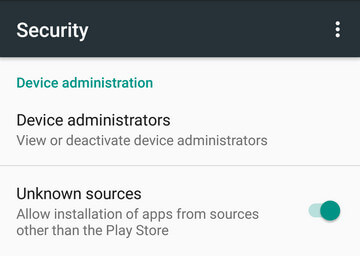
    • Allow installation of apps from unknown sources.
       Settings > Security > Unknown Sources        

    Root Android via KingoRoot APK Without PC Step by Step


    Step 1: Free download KingoRoot.apk.

    Root Android with KingoRoot apk, without connecting to PC
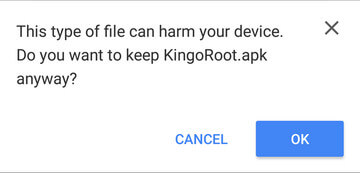
    The download will be automatically started. If Chrome has warned you about KingoRoot.apk, click "OK" to proceed.
    KingoRoot Apk Download, the best one-click root apk for free
    If you are using PC to view this tutorial, you have three choices.

    Step 2: Install KingoRoot.apk on your device.

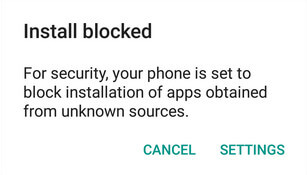
    If you didn't check "Unknown Sources" in Settings > Security, then during installation, you will get a prompt "Install blocked", stating that "For security, your phone is set to block installation of apps obtained from unknown sources".
    Root any Android device with KingoRoot, the best one-click Android apk root tool.
    Just follow phone instructions and install Kingo Root on your device and allow installs from "Unknown Sources".
    Root any Android device with KingoRoot, the best one-click Android apk root tool.

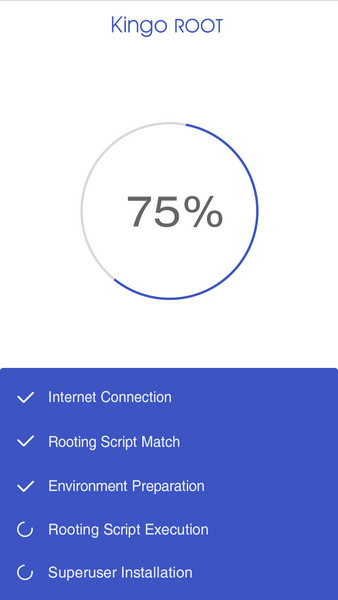
    Step 3: Launch "Kingo ROOT" app and start rooting.

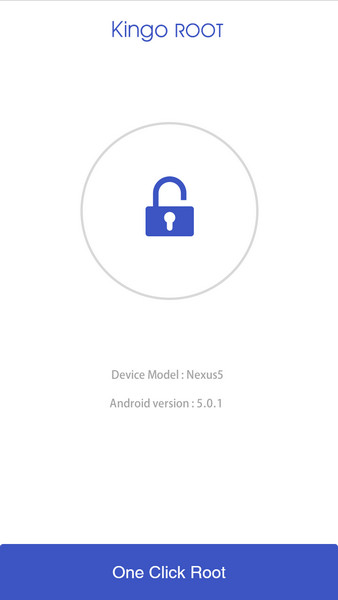
    Kingo Root is very user-friendly and easy to use. Click "One Click Root" to start the rooting process.
    Kingo Root Apk Main Interface

    Step 4: Waiting for a few seconds till the result screen appear.

    Kingo Root Apk Rooting

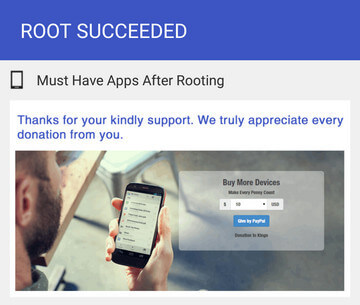
    Step 5: Succeeded or Failed.

    It is highly recommended that you try several times when rooting with KingoRoot apk version. We have several rooting methods integrated in apk root, however, it will only run one at a time.
    Kingo Root Apk Root Succeed


    MORE TO SAY If KingoRoot APK failed to root your device after several trials, please refer to KingoRoot Android (PC Version), which has a much higher success rate due to technical reasons.
    How to root any Android device and version with KingoRoot PC Version?


    (All credits goes to kingoroot)

    Saturday, April 21, 2018

    April 21, 2018

    How did Avicii die? Speculation over health troubles of DJ found dead at 28

    The death of superstar DJ Avicii has come as a major shock to his fans. No one was expecting the talented Swedish hitmaker, known for tracks like Hey Brother and Wake Me Up, to lose his life at just 28 years old. But some may have known that the musician, whose real name is Tim Bergling, retired from live performances due to health issues in 2016. What do we know so far about his cause of death? 


    A statement on Tim’s death has been released by his rep, and it reads: ‘It is with profound sorrow that we announce the loss of Tim Bergling, also known as Avicii. ‘The family is devastated and we ask everyone to please respect their need for privacy in this difficult time.’ No official cause of death has been confirmed yet but we do know Avicii had to have operations in 2014, two years before his pancreatitis diagnosis. Avicii has been releasing music since 2007 and became an international star thanks to his 2011 hit Levels.


    In 2016 he was diagnosed with acute pancreatitis caused by excessive drinking. Two years before that, he’d had his gall bladder and appendix removed. In his 2016 retirement statement, Tim wrote: ‘I know I am blessed to be able to travel all around the world and perform, but I have too little left for the life of a real person behind the artist.’ He was holidaying with friends in Muscat, Oman when his body was found on Friday April 20, 2018.


    Natural ‘introvert’ Avicii had spoken about his health issues in the past. He told the Hollywood Reporter in 2016 that he’d decided to leave DJing because he didn’t like the ‘scene’, explaining: ‘To me it was something I had to do for my health. ‘The scene was not for me. It was not the shows and not the music. It was always the other stuff surrounding it that never came naturally to me.


    ‘All the other parts of being an artist. I’m more of an introverted person in general. It was always very hard for me. I took on board too much negative energy, I think.’ He added that he was very pleased to be taking time for himself and that he felt better than ever, and more ‘stress-free’. Between that interview and his death, Avicii was thought to be recovering.


    Here is a link to the video.


    (all credits go to metro.co.uk )


    Popular Posts